Creating a Custom Field Type in Drupal with Validation and PHP Attributes
When building Drupal sites, standard field types like text, number, or entity reference cover most use cases. However, you will occasionally run into requirements where data must follow a strict, predictable business format.
Instead of slapping random validation functions onto a standard text field across different content types, the clean, reusable approach is to create a Custom Field Type.
In this tutorial, we will create a custom field called Mint Enquiry Reference. This field will capture data that must strictly start with E- followed by exactly six digits (e.g., E-123123), bundle its own form validation, and control how it displays on the frontend.
The Anatomy of a Drupal Field
To create a fully functional custom field type in Drupal, you need three distinct components working together:
- The Field Type (
FieldItemBase): Defines how the data is stored in the database schema. - The Field Widget (
WidgetBase): Defines the form element used when creating or editing content. - The Field Formatter (
FormatterBase): Defines how the field data is rendered for the end user.
Step 1: Define the Database Schema (The Field Type)
First, we create the plugin that tells Drupal what our field is and how to store it. Thanks to modern Drupal practices, we can use the #[FieldType] PHP attribute to handle plugin discovery natively. Create a file:
1<?php
2
3namespace Drupal\mint_field\Plugin\Field\FieldType;
4
5use Drupal\Core\Field\Attribute\FieldType;
6use Drupal\Core\Field\FieldItemBase;
7use Drupal\Core\Field\FieldStorageDefinitionInterface;
8use Drupal\Core\StringTranslation\TranslatableMarkup;
9use Drupal\Core\TypedData\DataDefinition;
10
11/**
12 * Provides an example field type for storing enquiry references.
13 */
14#[FieldType(
15  id: "field_mint",
16  label: new TranslatableMarkup("Mint Enquiry Reference"),
17  description: new TranslatableMarkup("Stores unique customer enquiry references."),
18  default_widget: "mint_widget",
19  default_formatter: "mint_formatter",
20)]
21class MintItem extends FieldItemBase {
22
23  /**
24   * {@inheritdoc}
25   */
26  public static function schema(FieldStorageDefinitionInterface $field_definition) {
27    return [
28      'columns' => [
29        'value' => [
30          'type' => 'text',
31          'size' => 'tiny',
32          'not null' => FALSE,
33        ],
34      ],
35    ];
36  }
37
38  /**
39   * {@inheritdoc}
40   */
41  public static function propertyDefinitions(FieldStorageDefinitionInterface $field_definition) {
42    $properties = [];
43    $properties['value'] = DataDefinition::create('string')
44      ->setLabel(t('Value'))
45      ->setRequired(TRUE);
46
47    return $properties;
48  }
49
50  /**
51   * {@inheritdoc}
52   */
53  public function isEmpty() {
54    $value = $this->get('value')->getValue();
55    return $value === NULL || $value === '';
56  }
57
58}Key Takeaways from the Schema:
- The Attribute Mapping: The
#[FieldType]block explicitly points to thedefault_widgetanddefault_formatterwe are about to create. This streamlines the UI configuration out of the box. schema(): We are keeping storage light by defining our storage value type as atinytext block.
Step 2: Enforce the "E-XXXXXX" Pattern (The Field Widget)
Next, we need a form element where users can type in the value. Rather than writing external hooks, we can handle the strict "starts with E- and has 6 digits" business requirement using an #element_validate callback nested directly within our widget class. Create another file:
1<?php
2
3namespace Drupal\mint_field\Plugin\Field\FieldWidget;
4
5use Drupal\Core\Field\Attribute\FieldWidget;
6use Drupal\Core\Field\FieldItemListInterface;
7use Drupal\Core\Field\WidgetBase;
8use Drupal\Core\Form\FormStateInterface;
9use Drupal\Core\StringTranslation\TranslatableMarkup;
10
11/**
12 * A widget bar.
13 */
14#[FieldWidget(
15  id: 'mint_widget',
16  label: new TranslatableMarkup('Default Enquiry Field'),
17  field_types: [
18    'field_mint',
19  ],
20)]
21class MintWidget extends WidgetBase {
22    /**
23     * {@inheritdoc}
24     */
25    public function formElement(FieldItemListInterface $items, $delta, array $element, array &$form, FormStateInterface $form_state) {
26        $value = isset($items[$delta]->value) ? $items[$delta]->value : '';
27        $element += [
28            '#type' => 'textfield',
29            '#default_value' => $value,
30            '#size' => 8,
31            '#maxlength' => 8,
32            '#element_validate' => [
33                [static::class, 'validate'],
34            ],
35        ];
36        return ['value' => $element];
37    }
38
39    /**
40     * Validate the field.
41     */
42    public static function validate(array $element, FormStateInterface $form_state) {
43        $value = $element['#value'];
44        if (strlen($value) == 0) {
45            $form_state->setValueForElement($element, '');
46            return;
47        }
48
49        // Allow empty values if the field is not required.
50        if ($value === '') {
51            $form_state->setValueForElement($element, '');
52            return;
53        }
54
55        // Must start with "E-".
56        if (!str_starts_with($value, 'E-')) {
57            $form_state->setError($element, t('The enquiry reference must start with "E-".'));
58            return;
59        }
60
61        $number = substr($value, 2);
62
63        // Must contain exactly six digits after the prefix.
64        if (!ctype_digit($number) || strlen($number) !== 6) {
65            $form_state->setError($element, t('The enquiry reference must contain exactly six digits after "E-".'));
66            return;
67        }
68
69        // Store the trimmed value.
70        $form_state->setValueForElement($element, $value);
71    }
72}
Step 3: Render the Enquiry Reference (The Field Formatter)
Lastly, we need to instruct Drupal how to render this data when a node or entity is viewed on the frontend. We will encapsulate the output values inside a semantic <div> tag but you are free to change the HTML structure however you wish.
Create another file:
1<?php
2
3namespace Drupal\mint_field\Plugin\Field\FieldFormatter;
4
5use Drupal\Core\Field\Attribute\FieldFormatter;
6use Drupal\Core\Field\FormatterBase;
7use Drupal\Core\Field\FieldItemListInterface;
8use Drupal\Core\StringTranslation\TranslatableMarkup;
9
10/**
11 * Provides a default formatter for the Mint field type.
12 */
13#[FieldFormatter(
14  id: 'mint_formatter',
15  label: new TranslatableMarkup('Enquiry Default Format'),
16  field_types: [
17    'field_mint',
18  ]
19)]
20class MintFormatter extends FormatterBase {
21
22  /**
23   * {@inheritdoc}
24   */
25  public function viewElements(FieldItemListInterface $items, $langcode) {
26    $element = [];
27
28    foreach ($items as $delta => $item) {
29      // Wrap the database value safely inside an HTML wrapper tag for theme consistency.
30      $element[$delta] = [
31        '#type' => 'html_tag',
32        '#tag' => 'div',
33        '#value' => $item->value,
34      ];
35    }
36
37    return $element;
38  }
39
40}
Seeing It All in Action
Once your files are saved into their respective directories, clear the Drupal cache (drush cr) or activate the module if it is not already.
Head over to any Content Type management screen (e.g., Structure > Content types > Article > Manage fields), click Add field, and you will see Mint Enquiry Reference listed as a native option. Try adding it, then create a test node to watch your strict format validation catch formatting errors in real time!
Lets see the screenshots:
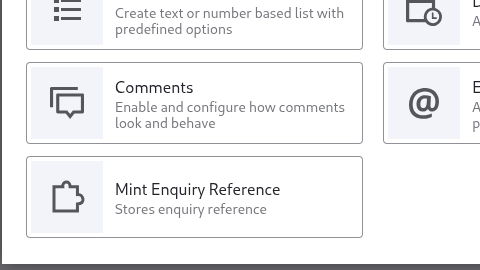
As you can see, the field type is available for use in content types (or for any entity type), lets click on it and provide the field name and finish adding the field.
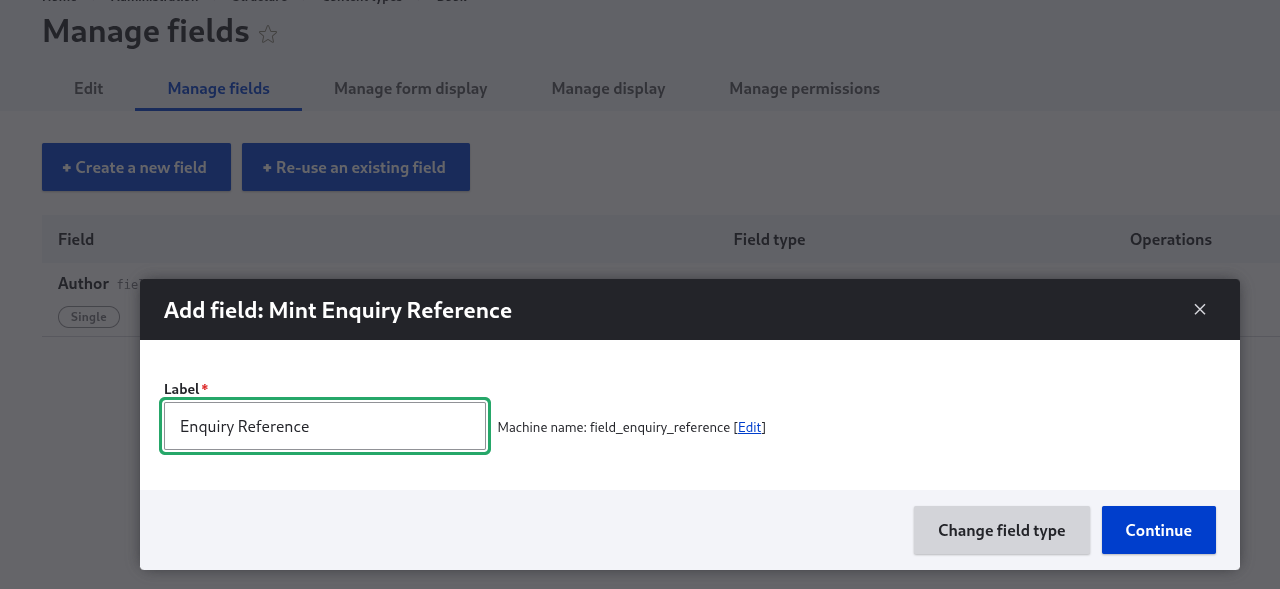
Follow the usual process for creating the field. After the field is added to your content type, you will notice that in manage form display section, the default widget that we created is selected for the field:

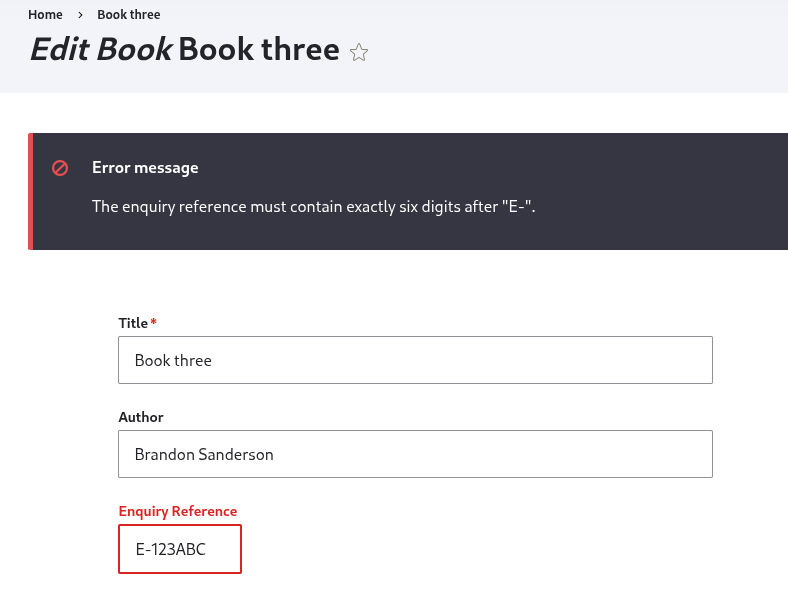
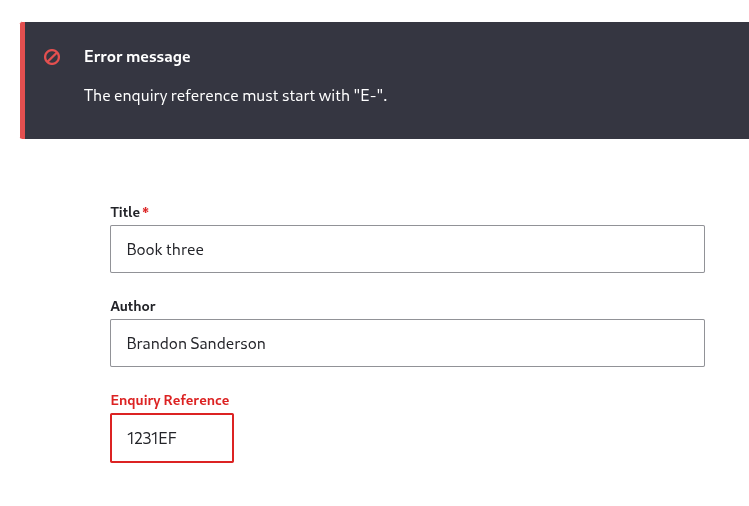
Lets try providing a string not matching the above pattern of E-XXXXXX when creating content of type using this field. We will get a validation error as we expect: